

NumPy Arrays Explained: Shape, Broadcasting and Speed
NumPy arrays vs Python lists, shape and dtype, vectorisation, broadcasting with a diagram, indexing, boolean masks and a speed test you can run.
Picture an egg tray at a kirana shop in Rajwada. Every slot is the same size, the slots sit in neat rows, and you can see all 30 eggs at once.
Now picture a bag of mixed groceries: a packet of salt, two onions, a soap bar. Each item is a different shape, and you have to dig around to find each one.
A Python list is the grocery bag. It can hold anything, but each item is wrapped separately and stored wherever there was space. A NumPy array is the egg tray. Every value has the same type and size, and all of them sit in one continuous block.
That one difference explains almost everything about why data scientists use NumPy.
What is a NumPy array?
Mapping the analogy:
- The tray is the array.
- "All slots are egg-sized" is the dtype (data type), for example
int64orfloat64. - "5 rows of 6 slots" is the shape, written
(5, 6). - Doing something to every egg at once is vectorisation.
A NumPy array is a fixed-type, grid-shaped block of values that supports fast maths on all elements at once.
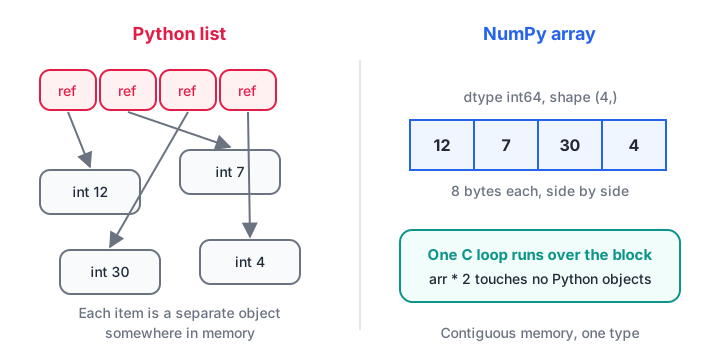
A list stores references to separate Python objects; an array stores the raw numbers next to each other, so one compiled loop can process them.
If lists themselves are new, revise the for loop tutorial first, because you will see what NumPy replaces.
Arrays vs lists: the first difference you will notice
Multiply a list by 2 and Python repeats it. Multiply an array by 2 and NumPy doubles every number.
import numpy as np

prices_list = [120, 80, 150]
prices_arr = np.array([120, 80, 150])

print("list * 2: ", prices_list * 2)
print("array * 2:", prices_arr * 2)
print("list + list:  ", prices_list + [10, 10, 10])
print("array + array:", prices_arr + np.array([10, 10, 10]))
With a list you would need a loop or a list comprehension to add GST to each price. With an array, arithmetic applies element by element automatically.
Shape, dtype and the attributes you will check most
Every array carries a few attributes you should look at whenever results seem wrong.
import numpy as np

# Daily orders for a tiffin service: 3 weeks x 7 days
orders = np.array([
    [42, 38, 45, 50, 47, 60, 55],
    [40, 41, 44, 52, 49, 63, 58],
    [39, 37, 46, 51, 50, 65, 61],
])

print("shape:", orders.shape)   # (rows, columns)
print("ndim: ", orders.ndim)
print("size: ", orders.size)
print("dtype:", orders.dtype)

mixed = np.array([1, 2.5, 3])
print("mixed ints and floats become:", mixed.dtype)
text = np.array([1, "two", 3])
print("a single string turns everything into:", text.dtype)
That last line is a common trap. One stray text value (like "NA" in a CSV) silently turns your whole numeric column into strings, and maths on it will fail.
Some useful ways to create arrays without typing every value:
import numpy as np

print(np.zeros(4))
print(np.ones((2, 3), dtype=int))
print(np.arange(0, 20, 5))
print(np.linspace(0, 1, 5))
print(np.arange(12).reshape(3, 4))
reshape only works when the total size matches: 12 values can become (3, 4) or (2, 6), but not (5, 3).
Quick check
What is the shape of np.arange(12).reshape(3, 4).sum(axis=0)?
axis=0 collapses the rows, leaving one total for each of the 4 columns.
Vectorisation: maths on whole columns
Vectorisation means writing an operation once for the whole array instead of looping in Python. The loop still happens, but inside NumPy's compiled C code.
import numpy as np

price = np.array([120.0, 80.0, 150.0, 60.0])
qty = np.array([3, 10, 2, 5])

subtotal = price * qty
with_gst = subtotal * 1.18
print("subtotal:", subtotal)
print("with 18% GST:", with_gst.round(2))
print("bill total:", with_gst.sum().round(2))
print("largest line:", with_gst.max(), "at position", with_gst.argmax())
On a 2-D array, you can summarise along rows or columns with the axis argument. axis=0 collapses rows (one result per column), and axis=1 collapses columns (one result per row).
import numpy as np

orders = np.array([
    [42, 38, 45, 50, 47, 60, 55],
    [40, 41, 44, 52, 49, 63, 58],
    [39, 37, 46, 51, 50, 65, 61],
])
print("total per week (axis=1):", orders.sum(axis=1))
print("average per weekday (axis=0):", orders.mean(axis=0).round(1))
print("busiest weekday index:", orders.mean(axis=0).argmax())
Broadcasting: when shapes don't match
What if you want to add a different bonus to each subject for every student? Your marks array has shape (3, 3), and your bonus array has shape (3,). NumPy broadcasts the smaller one across the bigger one.
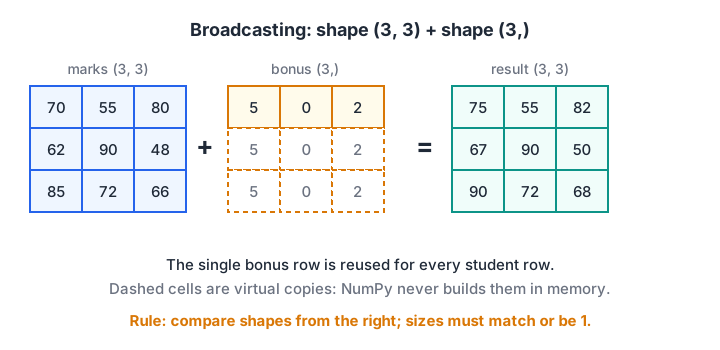
The bonus row is stretched virtually to match every student row. No extra copies are made in memory.
The rule: line the shapes up from the right. Each pair of sizes must be equal, or one of them must be 1. (3, 3) and (3,) work. (3, 3) and (2,) do not.
import numpy as np

marks = np.array([[70, 55, 80],
                  [62, 90, 48],
                  [85, 72, 66]])
bonus = np.array([5, 0, 2])          # one value per subject
print(marks + bonus)

attendance_bonus = np.array([[3], [0], [1]])   # one value per student, shape (3, 1)
print(marks + attendance_bonus)

try:
    marks + np.array([1, 2])
except ValueError as e:
    print("Error:", e)
The second example broadcasts a column instead of a row. Shape (3, 1) stretches across columns. Getting row-vs-column wrong is the most common broadcasting bug, so print shapes whenever you are unsure.
Indexing, slicing and boolean masks
Indexing works like lists, but with a comma for each dimension: arr[row, col]. Slices use start:stop, where stop is not included.
import numpy as np

orders = np.array([
    [42, 38, 45, 50, 47, 60, 55],
    [40, 41, 44, 52, 49, 63, 58],
    [39, 37, 46, 51, 50, 65, 61],
])
print("week 2, Monday:", orders[1, 0])
print("all weeks, weekend (last 2 days):\n", orders[:, -2:])
print("week 3, Mon to Wed:", orders[2, :3])
A boolean mask is an array of True and False of the same shape. Use it inside square brackets to keep only the True positions. This is how you filter data without a loop.
import numpy as np

temps = np.array([31, 34, 29, 38, 41, 36, 27, 40])
hot = temps > 35
print("mask:", hot)
print("hot days:", temps[hot])
print("count of hot days:", hot.sum())
print("hot and below 40:", temps[(temps > 35) & (temps < 40)])

capped = temps.copy()
capped[capped > 38] = 38
print("capped at 38:", capped)
Use & for "and" and | for "or", and wrap each condition in brackets. Python's and keyword does not work on arrays.
Quick check
Which line correctly keeps values between 10 and 20 from an array a?
NumPy masks combine with & and |, and each condition needs its own brackets.
How much faster is NumPy?
Here is a fair comparison: squaring 200,000 numbers with a Python loop versus one NumPy expression. Your exact timings will differ, especially in the browser, but the gap is usually large.
import time
import numpy as np

values = list(range(200_000))
arr = np.arange(200_000)

start = time.perf_counter()
squares_list = [v * v for v in values]
loop_time = time.perf_counter() - start

start = time.perf_counter()
squares_arr = arr * arr
numpy_time = time.perf_counter() - start

print(f"Python loop: {loop_time * 1000:.1f} ms")
print(f"NumPy:       {numpy_time * 1000:.1f} ms")
print("Same result:", squares_list[-1] == squares_arr[-1])
The speed comes from contiguous memory and compiled loops. It also explains why pandas, scikit-learn and most data libraries are built on top of NumPy. You will see the same masks and vectorised maths in the pandas DataFrame tutorial.
Common mistakes with NumPy arrays
- Slices are views, not copies. Changing
part = arr[:3]also changesarr. Use.copy()when you need an independent array. - Integer overflow in small dtypes. An
int8array holds only −128 to 127; values wrap around silently. - Using
and/orwith arrays. Use&,|and brackets. - Mixing strings into numeric data. The whole array becomes text.
- Wrong axis. If a sum has the wrong length, try the other axis.
When you want classroom practice on NumPy and pandas, classroom data science training in Old Palasia at Debugshala is one option, with classes held at the campus in English and Hindi.
Key takeaways
- Arrays hold one dtype in contiguous memory; lists hold references to separate objects.
- Check
.shapeand.dtypefirst whenever something looks wrong. - Vectorised expressions replace Python loops and run much faster.
- Broadcasting matches shapes from the right; sizes must be equal or 1.
- Boolean masks filter arrays in one line and carry straight over to pandas.
FAQ
Is NumPy necessary if I already know pandas?
Yes, at least the basics. Every pandas column is backed by a NumPy array, and many pandas errors only make sense once you understand dtypes, broadcasting and masks. scikit-learn models also take NumPy arrays as input.
What is the difference between a NumPy array and a Python list?
A list can mix types and grows easily, but each element is a separate Python object, so maths needs loops. An array has one dtype and a fixed shape, and supports fast element-wise maths. Use lists for general collections and arrays for numbers you want to calculate with.
Can I learn NumPy and pandas in a classroom in Indore?
Debugshala runs a Data Science & AI course at its Old Palasia campus in Indore and online, and NumPy is a standard part of any Python data science toolkit. You can ask how it is covered during the free demo class. Classes are in English and Hindi. Call +91-8982385539 for details.
How do I practise NumPy problems?
Change the numbers in each example above and predict the output before you run it. For timed coding and reasoning questions, Debugshala's free practice platform has free aptitude, reasoning and coding quizzes. The official NumPy user guide is the best reference once you know the basics.
From the team behind this site
Go further with the Data Science & AI Course at Debugshala
These tutorials are written by Debugshala, a training and placement institute at Old Palasia, Indore. The classroom course adds live mentoring, real projects and interview preparation.
- Offline classes at Old Palasia, Indore
- Free demo class before you pay
- Non-IT, fresher and year-gap friendly
- Placement assistance
700+ students placed · 200+ hiring partners · 4.9★ Google rating
