

Data Preprocessing: Feature Scaling and Encoding in Python
Feature scaling and categorical encoding in scikit-learn: StandardScaler vs MinMaxScaler vs RobustScaler, one-hot, ordinal and target encoding, pipelines.
Two students apply to the same college. One scored 430 out of 500 in a CBSE board. The other scored 492 out of 600 in a state board. Who did better?
You can't compare 430 with 492 directly. You convert both to percentages first: 86% and 82%. Now the comparison is fair. Admissions offices also turn the stream name, "Science" or "Commerce", into a code on their forms, because a sorting rule can't read words.
Machine learning models face the same two problems. Columns arrive on wildly different scales, and many arrive as text.
What is data preprocessing in machine learning?
Map the admissions story to the terms:
- Converting marks to percentages is feature scaling.
- Turning "Science" into a code is categorical encoding.
- The rule "divide by the maximum marks" is learned from each board and must be applied the same way to every new student. That is a fitted transformer.
Data preprocessing is the set of transformations, mainly scaling numeric features and encoding categorical ones, that convert raw columns into a consistent numeric form a machine learning model can learn from without bias towards any one column's units.
In scikit-learn, every preprocessing tool follows the same pattern: fit learns the parameters (means, ranges, category lists) from training data, and transform applies them. This article targets scikit-learn 1.4+ and pandas 2.x.
It follows outlier detection, which matters here because outliers decide which scaler you should pick.
Why does feature scaling matter?
Suppose a loan model uses age (20 to 60) and annual income (₹2,00,000 to ₹40,00,000). Any model that measures distance between rows will treat a ₹10,000 income difference as far larger than a 30-year age difference. Income drowns out age purely because of its units.
Scaling matters for three groups of models:
- Distance-based models such as k-nearest neighbors, k-means and SVMs compare rows by distance.
- Gradient-based models such as logistic regression and neural networks train faster and more stably when features share a range.
- Regularised models such as ridge and lasso penalise coefficient size, which is only fair when features share a scale.
Tree-based models (decision trees, random forests, gradient boosting) split on one feature at a time using thresholds, so scaling usually changes nothing for them.
Quick check
Which model is least affected by whether you scale the features?
Trees split one feature at a time on thresholds, so rescaling a column does not change which splits are possible.
StandardScaler vs MinMaxScaler vs RobustScaler
| Scaler | Formula | Result | Use when |
|---|---|---|---|
| StandardScaler | (x − mean) / std | Mean 0, std 1 | Default for most models |
| MinMaxScaler | (x − min) / (max − min) | Range 0 to 1 | Bounded inputs, images, some neural nets |
| RobustScaler | (x − median) / IQR | Median 0, IQR 1 | Outliers are present |
| Log transform | log(1 + x) | Shrinks long tails | Right-skewed money or count columns |
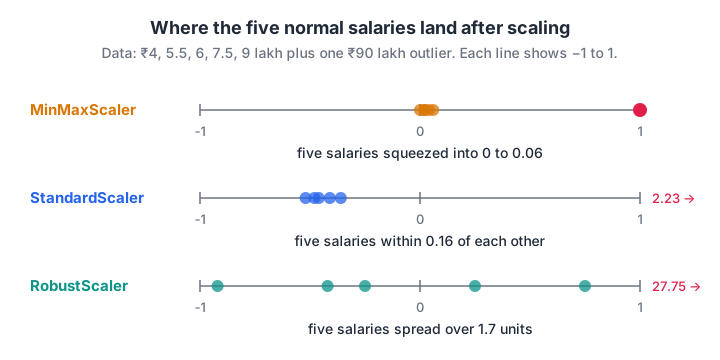
One ₹90 lakh salary squeezes every other value into a tiny corner under MinMaxScaler; RobustScaler keeps the ordinary salaries spread out.
Run the comparison yourself. Five ordinary salaries plus one extreme one:
import numpy as np
from sklearn.preprocessing import StandardScaler, MinMaxScaler, RobustScaler

salary_lakh = np.array([[4.0], [5.5], [6.0], [7.5], [9.0], [90.0]])

for scaler in (StandardScaler(), MinMaxScaler(), RobustScaler()):
    out = scaler.fit_transform(salary_lakh).ravel().round(2)
    print(f"{type(scaler).__name__:>15}: {out}")

print("\nlog1p then StandardScaler:",
      StandardScaler().fit_transform(np.log1p(salary_lakh)).ravel().round(2))
Under MinMaxScaler the five normal salaries all land between 0 and 0.06, so a model barely sees the difference between ₹4 lakh and ₹9 lakh. RobustScaler keeps them spread from about −0.9 to 0.75.
How do you encode categorical variables?
Models need numbers, so text categories must be converted. The right method depends on whether the categories have an order and how many there are.
Ordinal encoding for ordered categories
Education level has a natural order: 10th < 12th < Graduate < Postgraduate. Mapping them to 0, 1, 2, 3 keeps that order. Pass the order explicitly with OrdinalEncoder(categories=[[...]]). Otherwise scikit-learn sorts labels alphabetically, which matches the real order only by luck: T-shirt sizes would come out as Large, Medium, Small.
One-hot encoding for unordered categories
City has no order. If you encode Indore = 0, Bhopal = 1, Ujjain = 2, a linear model will believe Ujjain is "twice" Bhopal. One-hot encoding avoids this by creating one 0/1 column per city.
Two settings matter in practice:
handle_unknown="ignore"stops the encoder crashing when a new city appears in production; that row simply gets all zeros.drop="first"removes one column to avoid perfect collinearity (the dummy variable trap) in unregularised linear regression. Most other models don't need it.
Target encoding for high-cardinality columns
A column such as pin code may have 800 levels. One-hot would add 800 mostly-zero columns.
Target encoding replaces each category with the average target value for that category, for example the default rate per pin code. scikit-learn's TargetEncoder (added in version 1.3) uses internal cross-fitting so a row's own label does not leak into its encoding, and it shrinks rare categories towards the overall mean.
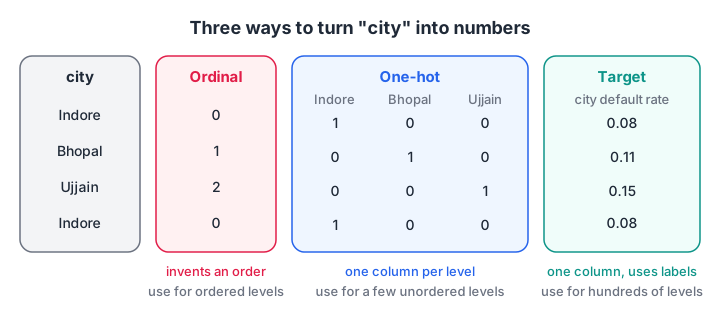
Ordinal adds false order to cities; one-hot adds one column per level; target encoding uses one column but learns from the labels.
import pandas as pd
from sklearn.preprocessing import OneHotEncoder, OrdinalEncoder

df = pd.DataFrame({
    "city": ["Indore", "Bhopal", "Ujjain", "Indore", "Dewas"],
    "education": ["Graduate", "12th", "Postgraduate", "Graduate", "10th"],
})

ohe = OneHotEncoder(handle_unknown="ignore", sparse_output=False)
city_cols = ohe.fit_transform(df[["city"]])
print(pd.DataFrame(city_cols, columns=ohe.get_feature_names_out()).astype(int))

order = [["10th", "12th", "Graduate", "Postgraduate"]]
edu = OrdinalEncoder(categories=order).fit_transform(df[["education"]])
print("\nEducation codes:", edu.ravel())
print("Unknown city ->", ohe.transform(pd.DataFrame({"city": ["Jabalpur"]})))
Quick check
A "city" column has 4 unordered values and you are training logistic regression. Which encoding fits best?
The cities have no order, and there are only four, so one-hot encoding is the safe and simple choice.
Putting it together with ColumnTransformer
Real datasets mix numeric and text columns, and each needs its own treatment. ColumnTransformer applies a different transformer to each group of columns, and Pipeline chains that with a model so the whole thing fits and predicts as one object.
Follow these steps:
- Split the data into train and test sets.
- List numeric, ordinal and nominal columns separately.
- Build a
ColumnTransformerwith a scaler, an ordinal encoder and a one-hot encoder. - Chain it with a model in a
Pipeline. - Call
fiton training data; callscoreorpredicton test data.
import numpy as np, pandas as pd
from sklearn.compose import ColumnTransformer
from sklearn.linear_model import LogisticRegression
from sklearn.model_selection import train_test_split
from sklearn.pipeline import Pipeline
from sklearn.preprocessing import OneHotEncoder, RobustScaler

rng = np.random.default_rng(0)
n = 800
df = pd.DataFrame({"age": rng.integers(21, 60, n),
                   "income_lakh": rng.lognormal(1.8, 0.5, n).round(2),
                   "city": rng.choice(["Indore", "Bhopal", "Ujjain", "Dewas"], n)})
risk = -0.04 * df["age"] - 0.25 * df["income_lakh"] + (df["city"] == "Dewas") * 0.8
y = (risk + rng.normal(0, 0.6, n) > risk.median()).astype(int)

prep = ColumnTransformer([("num", RobustScaler(), ["age", "income_lakh"]),
                          ("cat", OneHotEncoder(handle_unknown="ignore"), ["city"])])
model = Pipeline([("prep", prep), ("clf", LogisticRegression())])
X_tr, X_te, y_tr, y_te = train_test_split(df, y, test_size=0.25, random_state=1)
model.fit(X_tr, y_tr)
print("Test accuracy:", round(model.score(X_te, y_te), 3))
print("Features the model sees:", list(model[:-1].get_feature_names_out()))
The pipeline stores the training medians, IQRs and city list. When a new applicant arrives, the same numbers are applied, which is what makes the model safe to deploy. Inside cross-validation, each fold refits the pipeline, so no fold peeks at another.
If you want a mentor to review your first end-to-end pipelines, data science and machine learning classes at Debugshala cover preprocessing as part of every modelling project.
Common preprocessing mistakes
- Fitting the scaler on the full dataset. Test data then shapes the training transformation. Fit on train, transform both.
- Scaling the target by accident. Keep
yseparate unless you deliberately transform it and invert predictions later. - Label-encoding nominal categories for linear models. It invents an order that doesn't exist.
- One-hot encoding a column with thousands of levels. Use target or frequency encoding, or group rare levels into "Other".
- Scaling one-hot columns. 0/1 columns usually don't need it; leave them as they are.
- Using MinMaxScaler with outliers. One extreme value compresses everyone else.
Key takeaways
- Scaling puts numeric features on comparable ranges; encoding converts categories into numbers.
- StandardScaler is the default; RobustScaler handles outliers; MinMaxScaler gives a fixed range.
- Distance-based, gradient-based and regularised models need scaling; trees usually don't.
- One-hot for few unordered levels, ordinal for ordered levels, target encoding for many levels.
- Use ColumnTransformer and Pipeline so every transformation is learned from training data only.
Preprocessing makes features usable; the next lesson, feature engineering, makes them more informative. To check how well the rules have stuck, practise preprocessing MCQs on Debugshala Test.
FAQ
What is the difference between normalization and standardization?
Normalization usually means min-max scaling, which squeezes values into a fixed range such as 0 to 1. Standardization subtracts the mean and divides by the standard deviation, giving mean 0 and standard deviation 1. Standardization is the safer default; normalization suits bounded inputs without outliers.
Do I need to scale data for random forest or XGBoost?
Usually not. Tree-based models split each feature at thresholds, and rescaling a column does not change the order of its values, so the same splits are found. Scaling is still harmless, and it is needed if you combine trees with distance-based steps in the same pipeline.
When should I use one-hot encoding vs label encoding?
Use one-hot encoding for unordered categories with a manageable number of levels, such as city or payment method. Use ordinal (label) encoding when categories have a real order, such as education level or size. For tree models, ordinal codes on unordered categories often work too, but linear models will misread them.
Should I scale before or after the train-test split?
After. Split first, fit the scaler on the training set, then transform both training and test sets with it. Fitting on the full data lets test-set statistics leak into training. A scikit-learn Pipeline handles this automatically, including inside cross-validation.
Where can I learn data preprocessing for machine learning in Indore?
Debugshala, a training and placement institute at Old Palasia in Indore, covers scaling, encoding and scikit-learn pipelines in its Data Science & AI and Machine Learning courses. Classes run offline and online in English and Hindi. You can take a free demo class first, and non-IT graduates are welcome.
From the team behind this site
Go further with the Data Science & AI Course at Debugshala
These tutorials are written by Debugshala, a training and placement institute at Old Palasia, Indore. The classroom course adds live mentoring, real projects and interview preparation.
- Offline classes at Old Palasia, Indore
- Free demo class before you pay
- Non-IT, fresher and year-gap friendly
- Placement assistance
700+ students placed · 200+ hiring partners · 4.9★ Google rating
