

Ridge, Lasso and Elastic Net: Regularization in Python
Regularization in machine learning made clear: how ridge shrinks, lasso zeroes and Elastic Net blends coefficients, why scaling matters and how to pick alpha.
Think of a household in Indore planning a wedding with a fixed budget. Without any limit, the family would overspend on whatever looked important that week: a larger hall, then three extra caterers, then a band from Mumbai. Every decision would chase the latest opinion.
Now the elders set a rule. Every rupee spent above a sensible amount needs a strong reason. Some line items shrink a little. A few, like the Mumbai band, are cancelled outright. The wedding still happens, and the budget no longer swings with every suggestion.
That rule is what regularization does to a model.
What is regularization in machine learning?
Map the wedding to a linear model:
- Each line item is a coefficient, the weight a model gives one feature.
- Overspending on whatever looked important is overfitting: the model gives large weights to features that only happened to fit the training sample.
- The elders' rule is a penalty added to the training objective, and its strictness is the hyperparameter alpha.
- Shrinking an item is what ridge does. Cancelling an item is what lasso can do.
Regularization is a technique that reduces overfitting by adding a penalty on the size of a model's coefficients to its loss function, so the model prefers smaller, more stable weights unless the data strongly supports larger ones.
A plain linear model minimises only the squared error. A regularized one minimises error + alpha × penalty. This trades a little bias for a large drop in variance, the trade-off covered in overfitting and the bias-variance trade-off. It builds directly on linear regression, and all code here targets scikit-learn 1.7.
Why do linear models need regularization?
Two situations make plain least squares unstable.
Correlated features. Suppose a dataset of flat prices has area in square feet and area in square metres. They carry the same information, so the model can't decide how to split the credit between them. It often gives one a huge positive weight and the other a huge negative one.
Many features, few rows. With 40 features and 42 training rows, the model can fit the training data perfectly, noise included, and fail on anything new.
Here is the first problem in code. The price really rises by ₹4.5 lakh per 100 sq ft:
import numpy as np
from sklearn.linear_model import LinearRegression, Ridge

rng = np.random.default_rng(5)
n = 25
area = rng.uniform(6, 18, n)                       # flat area in hundreds of sq ft
area_m = area * 0.929 + rng.normal(0, 0.05, n)     # the same area in tens of sq m
price = 4.5 * area + rng.normal(0, 4, n)           # price in lakh rupees
X = np.column_stack([area, area_m])

ols = LinearRegression().fit(X, price)
ridge = Ridge(alpha=1.0).fit(X, price)
print("plain least squares [sqft, sqm]:", np.round(ols.coef_, 2))
print("ridge, alpha=1      [sqft, sqm]:", np.round(ridge.coef_, 2))
flat = [[10, 9.29]]                                # a 1,000 sq ft flat
print("predicted price, lakh:", round(ols.predict(flat)[0], 1), "vs", round(ridge.predict(flat)[0], 1))
Plain least squares says each extra 100 sq ft reduces the price by ₹14 lakh, cancelled out by a +20 on the square-metre column. Predictions look fine, but such coefficients swing wildly on new data. Ridge splits the effect sensibly, about 2 and 2.7.
How does ridge regression (L2) work?
Ridge regression adds the sum of squared coefficients to the loss:
ridge loss = sum of squared errors + alpha × (w1² + w2² + ... + wp²)Squaring punishes large weights much more than small ones. A coefficient of 20 costs 400 units of penalty, while two coefficients of 10 cost only 200. So ridge prefers to spread weight across correlated features rather than pile it on one. It shrinks every coefficient towards zero, but almost never to exactly zero.
The strength alpha is the dial. At alpha = 0, ridge is plain linear regression. As alpha grows, coefficients shrink further.
Quick check
What happens to a ridge model as alpha becomes very large?
A huge penalty forces all weights close to zero, so predictions approach the average value of the target.
How does lasso regression (L1) work?
Lasso (least absolute shrinkage and selection operator) penalises the sum of absolute values instead:
lasso loss = sum of squared errors + alpha × (|w1| + |w2| + ... + |wp|)The absolute value has a sharp corner at zero. Because of that corner, lasso finds it cheaper to set weak coefficients exactly to zero than to keep them small. Lasso therefore performs feature selection while it fits.
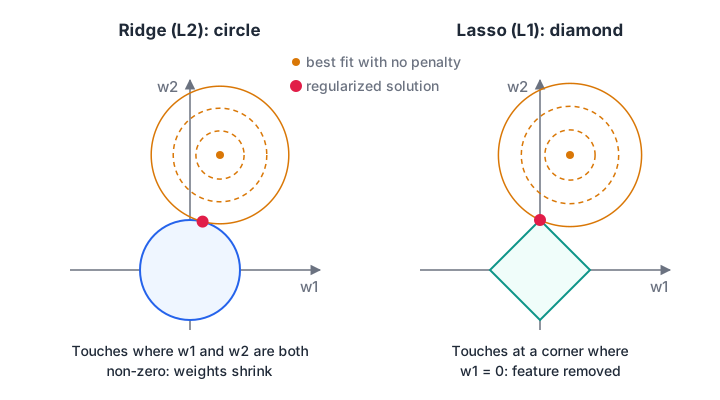
The coefficients must stay inside the penalty shape. The error contours usually touch the round L2 region at a point where both weights are non-zero, but touch the L1 diamond at a corner, where one weight is exactly zero.
Compare both on data where only a few of eight features matter:
import numpy as np
from sklearn.datasets import make_regression
from sklearn.linear_model import Ridge, Lasso
from sklearn.preprocessing import StandardScaler

# 100 rows, 8 features, but only 3 actually drive the target
X, y = make_regression(n_samples=100, n_features=8, n_informative=3,
                       noise=10, random_state=0)
X = StandardScaler().fit_transform(X)

print("alpha  | ridge coefficients                     | lasso coefficients")
for alpha in [0.1, 10, 100]:
    r = Ridge(alpha=alpha).fit(X, y).coef_
    l = Lasso(alpha=alpha).fit(X, y).coef_
    print(f"{alpha:6g} | {np.round(r, 0)} | {np.round(l, 0)}")
print("lasso zeros at alpha=10:", int(np.sum(Lasso(alpha=10).fit(X, y).coef_ == 0)), "of 8")
Ridge shrinks the two big coefficients from 58 and 77 down to 29 and 38 but keeps every feature. Lasso at alpha = 10 keeps two features and zeroes the other six.
At alpha = 100 lasso has zeroed everything, a sign the penalty is far too strong. Note that scikit-learn scales alpha differently in Ridge and Lasso, so the same number does not mean the same strength in both.
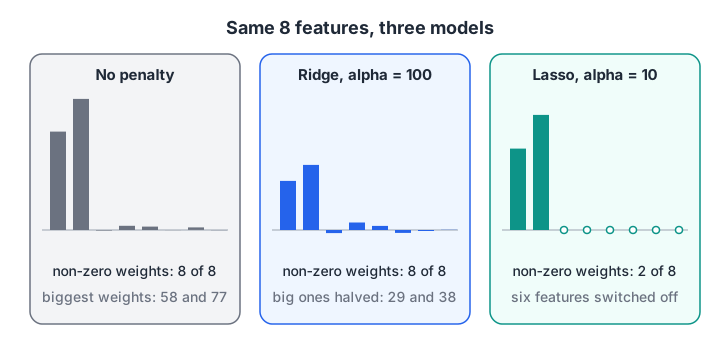
The same eight features under three models. Ridge turns the volume down on everything; lasso switches most features off.
Quick check
Which method can set some coefficients exactly to zero?
The L1 penalty in lasso has a corner at zero, which makes exactly-zero coefficients the cheapest solution for weak features.
What is Elastic Net and when should you use it?
Lasso has a weakness. When two features are almost copies of each other, it tends to keep one and drop or under-weight the other, and which one it picks can flip with a slightly different sample. That makes its feature choice look unstable.
Elastic Net adds both penalties. In scikit-learn, l1_ratio sets the mix: 1.0 is pure lasso, 0.0 is pure ridge, and 0.5 is an equal blend.
import numpy as np
from sklearn.linear_model import Lasso, ElasticNet

rng = np.random.default_rng(0)
n = 150
sqft = rng.normal(0, 1, n)                    # standardised flat area
sqm = sqft + rng.normal(0, 0.02, n)           # the same area in another unit
floor = rng.normal(0, 1, n)
X = np.column_stack([sqft, sqm, floor])
y = 10 * sqft + 10 * sqm + 5 * floor + rng.normal(0, 2, n)

for name, m in [("Lasso", Lasso(alpha=1.0, max_iter=50000)),
                ("ElasticNet", ElasticNet(alpha=1.0, l1_ratio=0.3, max_iter=50000))]:
    print(f"{name:>10} [sqft, sqm, floor]:", np.round(m.fit(X, y).coef_, 2))
Lasso gives the twins very different weights (about 4.7 and 14.3) although they are the same measurement. Elastic Net gives them equal weights of about 7.1, which is easier to explain and more stable across samples.
| Method | Penalty | Zeroes coefficients? | Correlated features | Good default when |
|---|---|---|---|---|
| Ridge | Sum of squares (L2) | No | Shares weight evenly | Most features matter a little |
| Lasso | Sum of absolute values (L1) | Yes | Picks one, drops others | You expect few features to matter |
| Elastic Net | Mix of L1 and L2 | Yes | Keeps groups together | Many correlated features, some useless |
Quick check
Your dataset has several groups of highly correlated features, and some features are useless. Which is the best first choice?
Elastic Net can zero out useless features like lasso while keeping correlated features together like ridge.
How do you choose alpha?
Alpha is a hyperparameter, so you pick it with cross-validation rather than by looking at test scores. scikit-learn has built-in versions that search alpha for you: RidgeCV, LassoCV and ElasticNetCV.
Follow these steps:
- Split off a test set.
- Build a pipeline of
StandardScalerfollowed by the CV model. - Fit on the training set; the model tries many alphas internally.
- Read the chosen
alpha_and score once on the test set.
import numpy as np
from sklearn.datasets import make_regression
from sklearn.model_selection import train_test_split
from sklearn.pipeline import make_pipeline
from sklearn.preprocessing import StandardScaler
from sklearn.linear_model import LinearRegression, RidgeCV, LassoCV

# 60 rows and 40 features: more features than a plain model can handle well
X, y = make_regression(n_samples=60, n_features=40, n_informative=5,
                       noise=15, random_state=1)
X_tr, X_te, y_tr, y_te = train_test_split(X, y, test_size=0.3, random_state=0)

models = {
    "LinearRegression": make_pipeline(StandardScaler(), LinearRegression()),
    "RidgeCV": make_pipeline(StandardScaler(), RidgeCV(alphas=np.logspace(-2, 3, 30))),
    "LassoCV": make_pipeline(StandardScaler(), LassoCV(cv=5, random_state=0)),
}
for name, m in models.items():
    m.fit(X_tr, y_tr)
    print(f"{name:>16}: train R2 {m.score(X_tr, y_tr):.3f} | test R2 {m.score(X_te, y_te):.3f}")
print("ridge alpha chosen:", round(models["RidgeCV"][-1].alpha_, 2))
lasso = models["LassoCV"][-1]
print("lasso alpha chosen:", round(lasso.alpha_, 2), "| features kept:", int(np.sum(lasso.coef_ != 0)), "of 40")
With 42 training rows and 40 features, plain regression scores a perfect training R² and a test R² of −2.7, worse than predicting the average. Ridge recovers to about 0.80.
Lasso reaches about 0.98 because only 5 features truly matter and it switches many of the useless ones off. For a broader search over several hyperparameters at once, see hyperparameter tuning.
Why scaling matters before regularization
The penalty treats every coefficient the same, but a coefficient's size depends on its feature's units. Income in rupees needs a tiny coefficient; age in years needs a bigger one. Without scaling, the penalty bites age hard and barely touches income.
import numpy as np
from sklearn.linear_model import Ridge
from sklearn.preprocessing import StandardScaler

rng = np.random.default_rng(3)
n = 200
income = rng.uniform(2e5, 2e6, n)          # yearly income in rupees
age = rng.uniform(22, 60, n)               # years
spend = 0.00001 * income + 0.3 * age + rng.normal(0, 1, n)   # monthly spend score
X = np.column_stack([income, age])
true = np.array([0.00001, 0.3])

raw = Ridge(alpha=20000).fit(X, spend).coef_
sc = StandardScaler().fit(X)
scaled = Ridge(alpha=200).fit(sc.transform(X), spend).coef_ / sc.scale_  # back to raw units
print("share of the true effect kept   [income, age]")
print("ridge on raw rupees and years :", np.round(raw / true, 2))
print("ridge after StandardScaler    :", np.round(scaled / true, 2))
On raw units, ridge keeps 96% of the income effect but only 54% of the age effect: the penalty is unfair. After scaling, both lose roughly half, so the rule applies evenly. The scalers themselves are explained in data preprocessing: scaling and encoding.
Common regularization mistakes
- Skipping the scaler. The penalty becomes a judgement about units, not about usefulness.
- Picking alpha by eye or on the test set. Use RidgeCV, LassoCV or a grid search with cross-validation.
- Reading lasso's zeros as proof a feature is useless. With correlated features, lasso may drop a useful one because its twin carries the same signal.
Practising these choices on messy real data, with someone reviewing your alpha search, is the kind of work done in an ML course in Indore built around projects. For a quick self-check, try regularisation quizzes on Debugshala Test.
Key takeaways
- Regularization adds alpha × penalty to the loss so the model prefers small, stable coefficients.
- Ridge (L2) shrinks all coefficients and handles correlated features; it rarely zeroes any.
- Lasso (L1) zeroes weak coefficients and doubles as feature selection.
- Elastic Net blends both and keeps correlated groups together.
- Scale features first and choose alpha with cross-validation.
FAQ
What is the difference between ridge and lasso regression?
Ridge adds the sum of squared coefficients as a penalty and shrinks all of them towards zero without removing any. Lasso adds the sum of absolute values, which can push weak coefficients exactly to zero. Use ridge when most features carry some signal, and lasso when you expect only a few to matter.
Is regularization only used in linear regression?
No. The same idea appears in logistic regression (the C parameter in scikit-learn is the inverse of the penalty strength), in support vector machines, and in neural networks as weight decay. Tree models use other forms, such as limits on depth or the number of leaves.
What is a good value of alpha?
There is no universal good alpha, because its effect depends on the data, the number of rows and the scaling. Search a wide log-spaced range such as 0.01 to 1,000 with cross-validation, then read the chosen value. RidgeCV and LassoCV do this search automatically.
Does regularization reduce bias or variance?
Regularization reduces variance and slightly increases bias. By keeping coefficients small, the model reacts less to the quirks of a particular training sample. If the model is already too simple and underfits, adding regularization increases bias further and usually hurts performance.
Can I learn ridge, lasso and Elastic Net at Debugshala in Indore?
Yes. Regression models and regularization are part of Debugshala's Machine Learning course at the Old Palasia campus in Indore. Classes are offline and taught in English and Hindi, and the course accepts fresh graduates and learners from non-IT backgrounds. You can book a free demo class before you pay.
From the team behind this site
Go further with the Data Science & AI Course at Debugshala
These tutorials are written by Debugshala, a training and placement institute at Old Palasia, Indore. The classroom course adds live mentoring, real projects and interview preparation.
- Offline classes at Old Palasia, Indore
- Free demo class before you pay
- Non-IT, fresher and year-gap friendly
- Placement assistance
700+ students placed · 200+ hiring partners · 4.9★ Google rating
