

Transfer Learning Explained: Feature Extraction vs Fine-Tuning
Transfer learning explained: why pretrained layers transfer, feature extraction vs fine-tuning, when to use each, plus PyTorch and Hugging Face examples.
Ravi has cooked Gujarati thalis for eight years. He now joins a restaurant in Indore that serves Malwa food: dal bafla, bhutte ka kees, garadu. On day one he does not relearn how to hold a knife, temper spices or judge when oil is hot.
He keeps all that general kitchen skill and spends two weeks learning only the new recipes. A complete beginner would need two years to reach the same level.
Machine learning models can work the same way. That is transfer learning.
What is transfer learning in machine learning?
Map the kitchen to models:
- Ravi's eight years of thali cooking is pretraining on a large source task.
- Knife skills and spice sense are the general features stored in the model's early layers.
- The Malwa menu is the target task, with far less training data.
- Learning just the new recipes is training a new head, the final task-specific layers.
Transfer learning is the practice of taking a model pretrained on a large source dataset and adapting it to a different but related target task, so the new model needs far less data, compute and time than training from scratch.
It is the default way deep learning is done today, for images, text and speech. Large language models are the most famous example: a model pretrained on huge amounts of text is adapted to answer support tickets or summarise reports, as covered in fine-tuning LLMs with LoRA.
If neural network layers are new to you, start with building a neural network from scratch.
Why does transfer learning work?
A deep network learns in layers. In an image model, the first layers respond to edges and colour blobs. Middle layers combine them into textures and shapes. The last layers detect whole objects specific to the training labels.
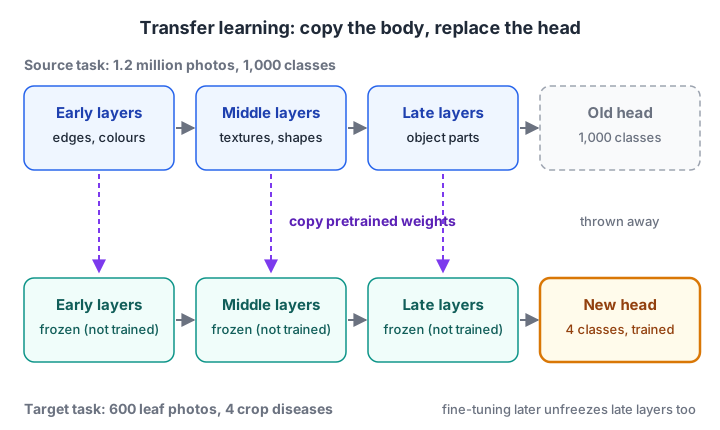
The pretrained body is copied and kept frozen. Only a new, small output head is trained on the target data.
Edges and textures are useful whether you are classifying cats, X-rays or soybean leaves from a farm near Indore. So the expensive part of learning, finding good features, can be done once on millions of examples and reused many times.
The same is true for text. A language model pretrained on billions of sentences already knows grammar and word meaning, which helps with sentiment, spam detection or classifying Hindi-English customer messages.
What transfer learning saves
| Resource | Training from scratch | With transfer learning |
|---|---|---|
| Labelled data | Tens of thousands to millions of examples | Often a few hundred to a few thousand |
| Compute | Days or weeks on many GPUs | Minutes to hours on one GPU |
| Time to a working baseline | Weeks | A day |
| Accuracy on small data | Often poor, overfits | Usually much better |
Feature extraction vs fine-tuning
There are two main ways to reuse a pretrained model.
Feature extraction: freeze every pretrained layer, chop off the old output layer, add a new head and train only the head. The pretrained body becomes a fixed feature generator. It is fast, needs little data and cannot damage the pretrained weights.
Fine-tuning: start the same way, then unfreeze some or all of the pretrained layers and keep training with a small learning rate. The body adapts to your data. It usually gives higher accuracy but needs more data and care.
Your choice depends on two questions: how much labelled data do you have, and how similar is your task to the source task?
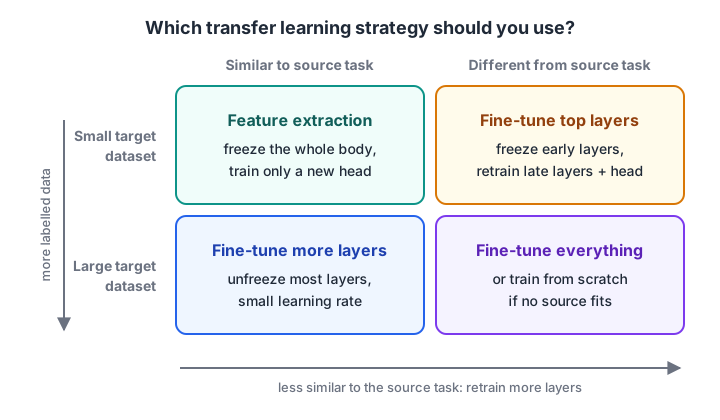
Little data pushes you towards freezing more layers. A task very different from the source pushes you to retrain more of the network.
Follow these steps for a typical project:
- Pick a pretrained model trained on data close to yours (natural images, medical images, English text, multilingual text).
- Replace the output layer with one sized for your classes.
- Freeze the body and train the head for a few epochs.
- If validation accuracy plateaus and you have enough data, unfreeze the top block and train again with a learning rate about 10 times smaller.
- Evaluate on a held-out test set, exactly as in model evaluation metrics.
Quick check
You have 400 labelled X-ray images and an ImageNet-pretrained network. What is the safest first step?
With little data, feature extraction avoids overfitting and protects the pretrained weights. Fine-tune top layers later if needed.
Quick check
Why do fine-tuning recipes use a small learning rate for pretrained layers?
The pretrained weights are already good. Small steps adapt them gently instead of overwriting them.
A runnable demo of transfer learning
Real transfer learning needs a deep learning framework, which does not run in the browser. The idea can still be shown with a linear stand-in.
Below, 2,000 "photos" from a large source dataset are used to learn a compact feature extractor (PCA plays the part of the pretrained body). A small target task then trains a classifier either on raw features from scratch or on the reused features.
import numpy as np
from sklearn.decomposition import PCA
from sklearn.linear_model import LogisticRegression

rng = np.random.default_rng(1)
n_pixels, n_factors = 300, 8
mixing = rng.normal(0, 1, (n_factors, n_pixels))     # shared "visual world" for both tasks

def photos(n, rule):
    z = rng.normal(0, 1, (n, n_factors))              # hidden factors: shape, colour, texture...
    X = z @ mixing + rng.normal(0, 10, (n, n_pixels)) # 300 noisy pixel-like features
    return X, (z @ rule > 0).astype(int)

X_big, _ = photos(2000, rng.normal(size=n_factors))  # big source dataset (its labels unused here)
body = PCA(n_components=8, svd_solver="full").fit(X_big)   # "pretrained" extractor
target_rule = rng.normal(size=n_factors)
X_test, y_test = photos(2000, target_rule)

for n in [20, 50, 200, 500]:
    X_small, y_small = photos(n, target_rule)
    scratch = LogisticRegression(max_iter=5000).fit(X_small, y_small).score(X_test, y_test)
    reused = LogisticRegression(max_iter=5000).fit(body.transform(X_small), y_small)
    print(f"{n:5d} labelled rows | from scratch {scratch:.2f} | reused features {reused.score(body.transform(X_test), y_test):.2f}")
With 20 labelled rows, the model from scratch is barely better than a coin toss (0.54), while reused features reach 0.73. As labelled data grows, the gap narrows from 19 points to 6. That is the core pattern of transfer learning: it matters most when labels are scarce.
A deep network does the same thing with far richer, non-linear features; the compression step used here is covered in the PCA tutorial of this series.
How many parameters do you actually train?
Freezing the body shrinks the trainable part of a model dramatically. ResNet-50, a popular image model, has about 25.6 million parameters, and its final layer maps 2,048 features to 1,000 ImageNet classes.
total_params = 25_557_032                     # ResNet-50, from the torchvision model card
old_head = 2048 * 1000 + 1000                 # weights + biases of the 1000-class layer
body = total_params - old_head
new_head = 2048 * 4 + 4                       # new layer for 4 crop-disease classes

print(f"pretrained body (frozen): {body:,}")
print(f"new head (trainable):     {new_head:,}")
print(f"share of parameters you train: {new_head / (body + new_head):.4%}")
You train about 8,000 numbers instead of 23.5 million. That is why feature extraction works on a laptop GPU with a few hundred photos.
Transfer learning in PyTorch and Hugging Face
The code below is for PyTorch 2.x with torchvision 0.15 or newer, which use the weights= argument. It loads an ImageNet-pretrained ResNet-18, freezes it and adds a four-class head.
import torch
from torch import nn
from torchvision import models

weights = models.ResNet18_Weights.DEFAULT
model = models.resnet18(weights=weights)
preprocess = weights.transforms()            # use the SAME resizing and normalisation as pretraining

for p in model.parameters():                 # stage 1: feature extraction
    p.requires_grad = False
model.fc = nn.Linear(model.fc.in_features, 4)   # new head is trainable by default
optimizer = torch.optim.AdamW(model.fc.parameters(), lr=1e-3)
# ... train a few epochs on your 4-class dataset ...

for p in model.layer4.parameters():          # stage 2: fine-tune the top block
    p.requires_grad = True
optimizer = torch.optim.AdamW([
    {"params": model.layer4.parameters(), "lr": 1e-4},   # smaller rate for pretrained weights
    {"params": model.fc.parameters(), "lr": 1e-3},
])
For text, the Hugging Face transformers library does the head swap for you. Asking for num_labels=3 attaches a fresh classification head to the pretrained encoder.
from transformers import AutoTokenizer, AutoModelForSequenceClassification

name = "distilbert-base-uncased"
tokenizer = AutoTokenizer.from_pretrained(name)
model = AutoModelForSequenceClassification.from_pretrained(name, num_labels=3)

for p in model.base_model.parameters():      # optional: freeze the encoder (feature extraction)
    p.requires_grad = False

batch = tokenizer(["Delivery was late again", "Loved the packaging"],
                  padding=True, return_tensors="pt")
print(model(**batch).logits.shape)           # torch.Size([2, 3])
The Hugging Face tutorial shows how to find and load pretrained models, and convolutional neural networks explains the image layers being reused.
Transfer learning vs related techniques
| Technique | What is shared | Typical use |
|---|---|---|
| Transfer learning (feature extraction) | Frozen pretrained body; new head | Small labelled dataset, similar domain |
| Fine-tuning | Pretrained weights, updated on new data | Moderate data, or a domain that differs |
| Multi-task learning | One shared body trained on several tasks at once | Related tasks trained together, such as detecting both age and gender |
| Knowledge distillation | A big "teacher" model's outputs train a small "student" | Shrinking a model for phones or edge devices |
| Domain adaptation | Features made to work across two data distributions | Same task, different data, such as studio photos vs phone photos |
| Federated learning | Model updates from many devices; data stays local | Private data spread across phones or hospitals |
Distillation and quantisation for small devices appear again in model quantization for edge AI.
Common transfer learning mistakes
- Wrong preprocessing. Pretrained models expect the exact resizing and normalisation used in pretraining. Use the weights' own transforms.
- Learning rate too high when fine-tuning. Large updates wipe out pretrained knowledge, often called catastrophic forgetting. Use rates 10 to 100 times smaller than for training from scratch.
- Unfreezing everything on tiny data. With 300 images, a fully unfrozen network overfits fast. Freeze first, unfreeze gradually.
- Picking a source that is too different. An ImageNet model helps with leaf photos, but less with spectrograms or satellite bands. Prefer a source close to your data.
- Skipping a simple baseline. For tabular data, gradient boosting from scratch often beats any transfer approach.
- Ignoring licences. Check the pretrained model's licence before using it in a product.
Judging when to freeze, when to unfreeze and whether the result is good enough comes faster with a mentor reviewing your runs, as in the project-first ML batches at Debugshala. For concept revision, take a deep learning concepts quiz on Debugshala Test.
Key takeaways
- Transfer learning reuses a model pretrained on a big source task for a related task with less data.
- Early layers learn general features; late layers are task-specific, so you replace the head.
- Feature extraction freezes the body; fine-tuning also updates some pretrained layers with a small learning rate.
- Transfer helps most when labels are scarce, and the gain shrinks as data grows.
- Match preprocessing to the pretrained model and start from a source domain close to yours.
FAQ
What is an example of transfer learning?
A common example is taking an image model pretrained on ImageNet, which has over a million labelled photos, and retraining only its last layer to identify four crop diseases from a few hundred leaf photos. Another is adapting a pretrained language model to classify customer complaints into categories.
What is the difference between transfer learning and fine-tuning?
Transfer learning is the overall idea of reusing a pretrained model for a new task. Fine-tuning is one way of doing it, where you continue training some or all pretrained layers on the new data. The other way, feature extraction, keeps the pretrained layers frozen and trains only a new head.
When should you not use transfer learning?
Skip it when no pretrained model exists for a similar kind of data, when your dataset is very large and very different from any source, or for ordinary tabular business data, where gradient boosting or linear models trained from scratch usually work better and are simpler to maintain.
Does transfer learning need a GPU?
Feature extraction on a few hundred images can run on a CPU, though slowly. Fine-tuning larger models practically needs a GPU. Free cloud notebooks with GPUs are often enough for learning projects, since transfer learning trains far fewer parameters than training from scratch.
Where can I learn machine learning and deep learning in Indore?
Debugshala, a training and placement institute at Old Palasia in Indore, runs a Machine Learning course and a Data Science & AI course, taught in English and Hindi. Fresh graduates, non-IT learners and people with a year gap can join. Attend the free demo class to ask how deep topics like transfer learning are covered.
From the team behind this site
Go further with the Data Science & AI Course at Debugshala
These tutorials are written by Debugshala, a training and placement institute at Old Palasia, Indore. The classroom course adds live mentoring, real projects and interview preparation.
- Offline classes at Old Palasia, Indore
- Free demo class before you pay
- Non-IT, fresher and year-gap friendly
- Placement assistance
700+ students placed · 200+ hiring partners · 4.9★ Google rating
